Sena Firmware Archive
This repository preserves older firmware versions and installers for Sena Bluetooth communication devices (20S, 50S, R1 EVO, etc), after Sena made firmware downgrades more difficult.
Background
I borked my Sena 50S after updating its firmware. Music sharing stopped working properly, volume control via phone buttons broke, and I spent way too much time figuring out how to downgrade.
Turns out the newer Sena Device Manager versions don't allow downgrading anymore. I saw people on forums scrambling to find old firmware files and sharing tips to get their several hundred dollar equipment working again. So I put together this archive with all the firmware versions I could find, plus the old Device Manager installer that still lets you downgrade.
Common problems people have after firmware updates:
- Music sharing issues
- Pairing problems with phones or other Sena devices
- Mesh connection failures
- Volume control not working
If you're having these issues, downgrading firmware usually fixes them.
How to Downgrade
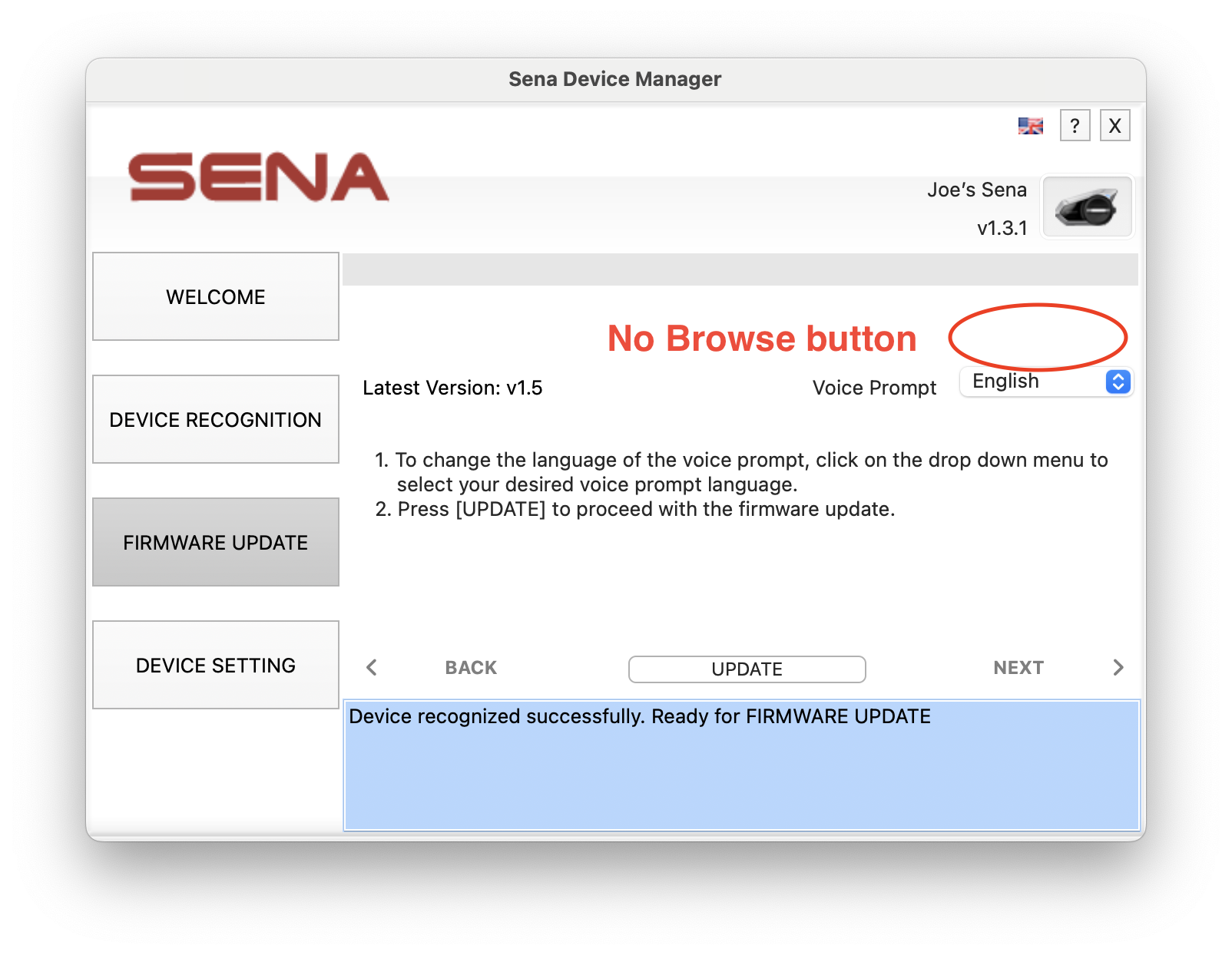
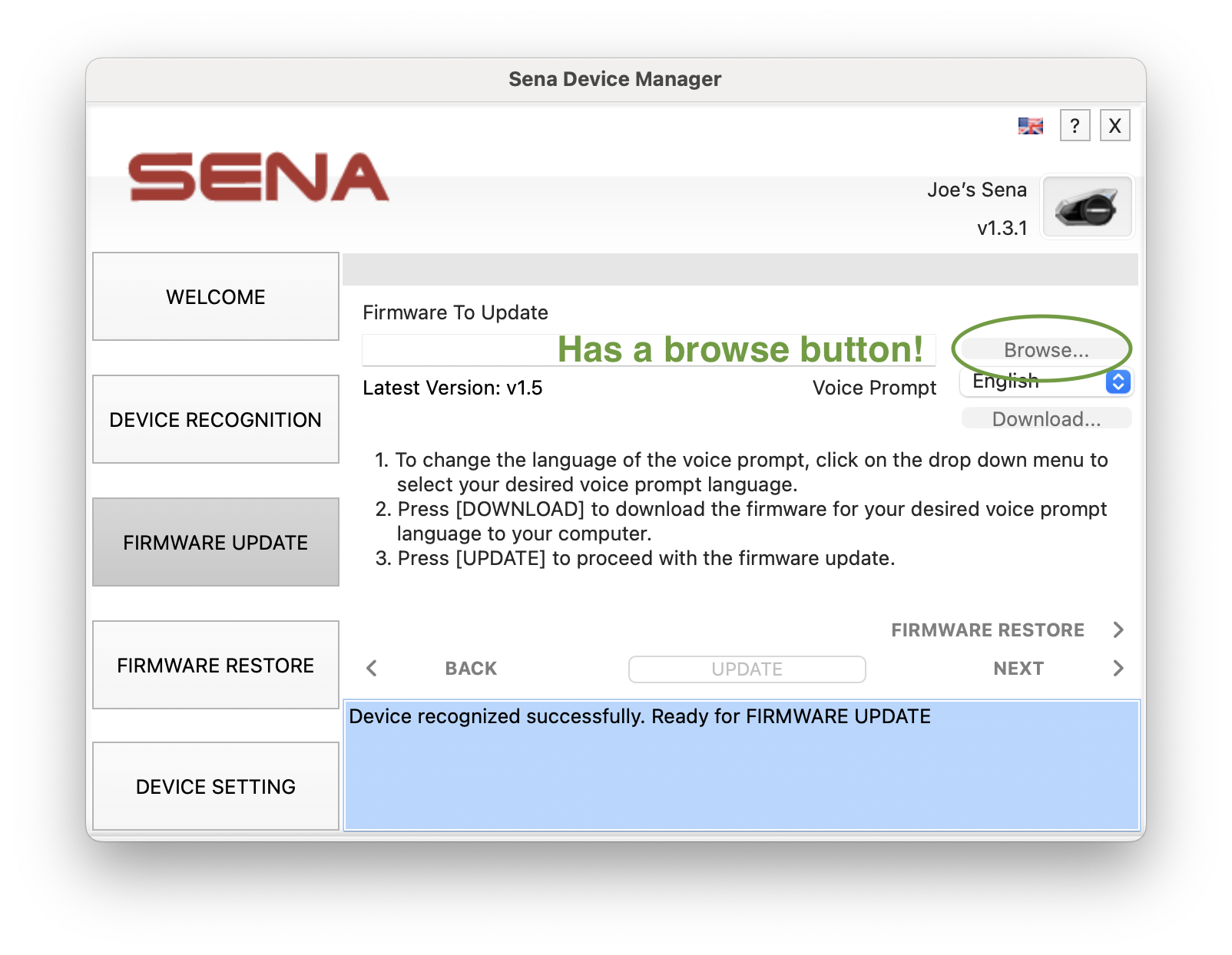
The key is using Device Manager v4.4.9 - the last version with a browse button to select your own firmware file. Newer versions removed this.
Compare these screenshots:
Newest manager (v4.4.17) - no browse button:
Old manager (v4.4.9) - has browse button:
Steps to Downgrade
Download the firmware file
- Scroll to the firmware download section below (or check the firmware folder in this repo)
- Choose your device model
- Download the firmware version you want (for 50S, v1.3.1 works well for me)
Download Sena Device Manager v4.4.9
- Scroll to the installers section below
- Download v4.4.9 for your operating system
- Note: You can also download directly from Sena's site:
- Mac:
https://firmware.sena.com/senabluetoothmanager/SENADeviceManagerForMAC-v4.4.9.pkg
- Windows:
https://firmware.sena.com/senabluetoothmanager/SenaDeviceManagerForWindows-v4.4.17-setup.exe
Install Device Manager v4.4.9
- Run the installer
- Important: Click NO when it prompts you to update to the newer version
- Open Device Manager after install
Connect your Sena
- For the 50S: Connect via USB-C cable and keep it off
- For other models, follow the prompt on the device manager
Install the old firmware
- Click next on the welcome screen, wait for Device Manager to recognize your Sena
- Under "Firmware to Update", click the Browse button
- Select the firmware file you downloaded in step 1
- Wait for it to complete
Important Notes
- I had to delete the Sena smartphone app from my phone and reinstall it to get all the old functionality back
- If you're still having issues, try a factory reset of your Sena device
Dev Notes
Using CharlesProxy I was able to sniff out what requests the Sena Device Manager was making. The following is of interest:
- All of Sena's latest firmware is listed at
https://firmware.sena.com/senabluetoothmanager/Firmware
- All of the latest Device Managers are listed at
https://firmware.sena.com/senabluetoothmanager/Software
- The version numbers follow an easy pattern, so with a bit of AI it's easy to enumerate and download all of the versions from Sena's website.
Thanks
- Thanks to Brandon Danowski for posting the 50S firmware. This helped me fix my Sena and inspired me to help solve this for others.
Disclaimer
This is an unofficial archive. Firmware files are property of Sena Technologies. Use at your own risk. The maintainers of this repository are not responsible for anything.